
Autodesk Water Try Two
A continuation...

In the one of my last posts - I discussed primarily the early design tools - Hydraflow Storm Sewers and the derivatives a part of Autodesk’s water portfolio. While I split the post in two primarily due to length - the ability to separate the Hydraflow design tools from the other tools is a key distinguisher.
The principal of storm sewer design software is to solve for the size and slope of the conveyance system that does not exist. The goal of the software helps user’s layout pipes and inlets, and size them. [I should be a little more careful - as most only do the size portion] As I learned the art and practice of engineering - elements like graphical TR-55 and nomographs were the table steaks before transitioning to the PC.
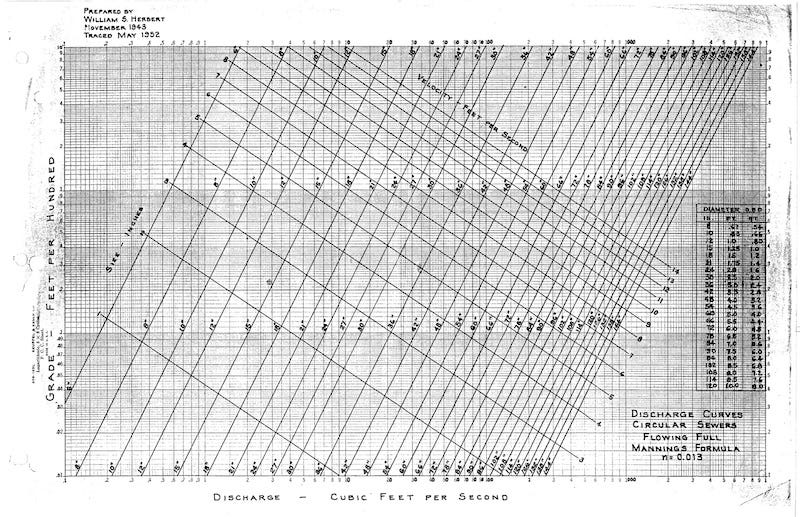
Some of those first packages were simply painful to work with. While they solved slope and size, while calculating the HGL and EGL values - I developed workflows to adjust that design to work, but I did appreciate the software’s ability to provide sizes, but manually dealt with the pipe grading separately.
In this second batch of software in the Autodesk portfolio - these applications are primarily in the “simulation class.” That is - they do not solve for slope or diameter, but they include time, and they route the flow down the system.
For some, this is assumed to be superior to the methods listed in HEC-22 Chapter 7. However, having worked with FDOT, Caltrans, WisDOT, and NMDOT on their workflows - the FHWA guidance is primarily the key. Even TxDOT expects this workflow even when they also allow SWMM methods for the volumetric concerns. It becomes not exclusionary, but complementary. That is prove to me that it meets Chapter 7, then you can proceed to a design.
Let’s take a look at these simulation tools.
Autodesk Storm and Sanitary Analysis
This was acquired by Autodesk from BOSS International as in 2009. This purchase included certain assets, but it left others. There was an integrated AutoCAD Civil 3D version that did became shelfware, along with a few other BOSS bits like WaterCAD. [Remember it predated pressure pipes in Civil 3D] I did some early QA work with the Autodesk team back when the engineering recession soured lots of development.
Strengths: Multiple Hydrology methods enhanced hydraulic engine that included various enhancements for storage elements, and stormwater inlets. By pairing TR-20 for hydrology - SSA made an easy jump into hydraulic routing with the SWMM engine.
Weaknesses: The engine at the time I joined Autodesk was about 6 or 7 releases behind the EPA engine, so it lacks much of the new features between 5.0.13 and 5.022. I am not aware of any update that Autodesk might have done to bring SSA into the 5.1 series engine (multi-threading, etc.) SSA can signal where flooding or failures occur, but it lacks the capability to design a pipe or inlet.
It suffers from the limitations of the Hydraflow Storm Sewer file format as the intermediate step between Civil 3D and SSA.The GUI is old, written in Delphi, but handy, but needs significant UX work. The graphs are well structured, but profile animation is a recalculation animation and glitchy.
Lack of leadership to move this forward.
Opportunities: The ability to round trip Civil 3D to SSA and back existed but very few used it. It’s in the FDOT State Kit or was and I presented that years ago at AU.
Threats: Innovyze software. While ICM contains the SWMM engine - it’s does not year have inlets - therefore it’s a hard like-for-like sell. InfoDrainage appears to fit the design/sim workflow - but, see below.
Observations: When I presented SSA to Caltrans, I simply had to toss the entire agenda. “It was not the design software we wanted”- paraphrased.
Innovyze InfoDrainage
This was acquired by Autodesk as a part of the Innovyze acquisition. Originally developed to assist in the design of Green Infrastructure or SuDs as they call them in jolly old England. When I joined XP Solutions as Product Manager for XPSWMM - XPDrainage was trying to enter the US market. There were cheerleaders, but it never really caught on.
Strengths: Includes two steps - a design step and the time-vary simulation. Ponds have a shape! The GI/SuDs/LIDs are unique as hydraulic elements in the engine which contrasts nicely with EPA-SWMM. It’s a great tool and replacement for Microdrainage.
Weaknesses: It’s a UK tool. I’ve never seen the design part of InfoDrainage provide proper FHWA output. It’s just now getting HGL/EGL values which for the US market and those HEC-22 workflows requirements is a must have.
Lack the precision needed to place very large glyphs for inlets when precision and station/offset values are needed - especially for DOT work. There is no linear stationing or any layout design tools. Its either done elsewhere (Civil 3D) or manually placed.InfoDrainage uses attributes to tag part catalogs elements to allow better exchange with Civil 3D. It’s much better than it was, but its part family awareness falls short for me.
Opportunities: Expectations. There are lots.
Threats: Resistance. I think I have seen too many ‘when is this included in my collection’ comments so getting customer to purchase InfoDrainage in addition to Civil 3D. The US market simply takes time for engineers to use the tools and accept them - especially ones that attempt to change how we work without engineers asking for these changes.
Observations: Now working in Texas on DOT projects - we use Bentley Openroads Drainage and Utilities - so I am not keeping abreast of any changes since I left Autodesk last year short of seeing LinkedIn posts of the capabilities.
InfoWorks ICM
This came to Innovyze via Wallingford Software. ICM is Integrated Catchment Modeling, and there are roots in CS/SD and RS and a few others. It falls into two very large buckets - a 1D version called Standard, and a 2D version called Ultimate in the Autodesk portfolio. There used to be over 100 different flavors.
Strengths: Built with a work-sharing remote system in mind. Conflict resolution, and proprietary database and engine. Terrain-sensitive 2D meshing. Always liked the dual-drainage workflow in ICM for 1D storm networks.
Weaknesses: Proprietary database locks results into long-post-simulation-processing to finalize results sharing. Why isn’t a final water surface elevation TIF image ready immediately?
Meshing and results - in the day and age where a flood simulation plan includes multiple project options - it’s very difficult to explain away why the butterfly flapped its wings away from the project.
While it shares the same SWMM engine that InfoDrainage with less functionality in 1D (no inlets, and EPASWMM-style LIDs, not the hydraulic ones)
Visual display of flooding - why can’t the velocity vectors show direction and velocity at the same time?
Opportunities: SWMM and sub-grid-sampling.
Threats: Resistance from Innovyze customers on the new business model.
Observations: InfoWorks ICM stores everything in metric, and I will admit that I have seen a fair amount of misapplication of coefficients applied. If I had to enter my shoe size as 42 in the user interface, I would continually have to grab my shoe to figure out which number are they asking for?
Not on the list: River and Flood Analysis. This tool came via the acquisition of BOSS International assets, but it was announced about a year ago to be retired. I really liked this tool having used it in the past and had a great time revamping the ribbon layout.
InfraWorks Flood Simulation: While working on the InfraWorks team as the analytics PM, we worked with Hydronia to develop a proof-of-concept workflow for early conceptual flood studies. This became Project Boulder, and later was included in InfraWorks that required a purchase of an engine from Hydronia. This introduced Autodesk to new workflows that they weren’t really aware of at the time. I wanted to mention it as a part of the overall portfolio of tools that got stale.
The HEC-22 part of these is a beast of a spreadsheet - that I will publish later.
Hi Matthew,
Thank you for your insightful post. I am someone who wants to learn Storm Sewer Design. Short of joining a team/company working in this field, how could I teach myself this skill, while also becoming proficient in, lets say, doing the design in Civil 3D. Civil 3D has a student version but Innovyze/Microdrainage doesn't. I am willing to go for training/on-line courses. Is there anything you would recommend? My background is civil engineering and I am studying in University right now. Any resources you could direct me towards would be a great help. Thank you.